Hyperstructure: Computers built around things that you care about
Abstract
Computers should help us with organizing our lives, rather than making them more difficult. We conjecture that we need a system structured around items — things that we care about, such as people, arguments and ideas, and able to express the relationships between them, so that connected to e.g. an idea we see all arguments we have considered for or against it.
Based on Nelson’s ideas, we describe the design of a computing environment based on a hyperstructure, a user-visible data structure for connecting related items and storing information about them (using typed bi-directional links).
We also discuss Fenfire, our implementation-in-progress, and related user interface innovations particularly suited for hyperstructure.
1 Introduction
Computers are supposed to be “information technology,” to help you to keep your information organized. An ideal environment should help us keep track of, for example,
- “Personal information”: contacts, addresses, appointments, birthdays;
- Ideas: thoughts, arguments, proposals, hopes, fears, plans;
- Work: budgets, employees, phone calls, courses we have taken, marks we have been awarded, types of poems, types of plants, classes in a program and structures in a plot.
This system should center around the things we care about, the people, appointments and so on. We believe that a system is needed in which these items (Nelson 2000) are visible things that can be connected to each other; in technical terms, a hypermedia system in which items are first-class objects.
There are prototype hypermedia systems that allow a file to contain varying schemas of information suitable for representing items. However, to obtain an environment in which all items can be connected to other items, the items have to be first-class in the operating system itself — similar to the ideas in HOSS/structural computing (Nürnberg et al 1996, Nürnberg et al 1997).
In contrast, in the mainstream file system paradigm, only documents and groups of documents (folders) are represented as first-class objects. While documents certainly qualify as things that we care about, other items like people, theories, or places are not explicitly represented in this paradigm at all. Additionally, file systems are simple hierarchies, rather than allowing arbitrary relationships between items to be expressed. Information like “In this meeting, we discussed possible solutions A, B, C to problem X, and our consensus was that…,” for example, might be hidden in a document called “Minutes 2003-07-24.”
In an item-centric system, this information would be expressed as relationships between several items: the problem, the meeting, the solutions discussed, the arguments raised in this discussion, the decisions reached. Looking at the problem item, for example, the user would connect to it the solutions that have been discussed for it, and to them the arguments that have presented in favor or against each of the solutions– no matter in which meeting, in which e-mail, in which memo or in which chat session they were made. (On the other hand, the user could just as well look at all the points made in a particular meeting, no matter which topic they were about.)
In file systems, you have to remember what information you stored where, like with paper notes. We conjecture that an item-centric system can improve on this problem greatly, because after you have connected information to an item, the information can always be shown when looking at that item.
Also, many items that do have a representation in current systems– for example appointments (often all appointments are stored in a binary, proprietary database file) and e-mail (usually several stored in one file)– are not represented as files. In mainstream systems, it is generally not possible to make connections between an e-mail and an appointment if they are stored in different files.
Hypermedia was meant to be an extension to the mind: Vannevar Bush entitled his famous article “As We May Think” (Bush 1945); Engelbart (1962) set “Augmenting Human Intellect” as his goal, and Nelson (1965)envisioned a system “holding everything [a novelist or absent-minded professor] wanted in just the way he wanted it to be held.”
Perhaps an item-centered computing environment can fulfill this promise.
The remainder of this paper is structured as follows. In Section 2, we describe our proposed user interface for an item-centered computing environment. In Section 3, we characterize the underlying item network structure, hyperstructure, and describe two particular hyperstructures: Nelson’s zzStructure, and the Resource Description Framework (RDF), which is used in our work. We also give a real-world example for the use of hyperstructure. In Section 4, we describe the Fenfire project, our effort to implement an item-centered computing environment. Section 5 discusses related work, and Section 6 concludes.
2 An item-based user interface
Let us stress that the system we discuss is not primarily intended as a medium for communicating information to others, but as a tool for personal use – working/editing/authoring/programming.
Much of the work on the hypertext/hypermedia field is focused on presenting information to and audience, on hypertext/hypermedia being a medium. The extensional structure, as introduced by DeRose (1989) is an important concept in this context: it could be said to be structure that is not part of the medium of presentation.
An item-centered system could look as shown in Figure 1.
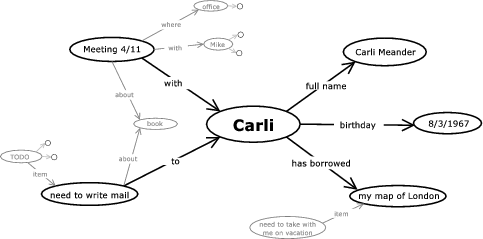
Figure 1: A mockup of a computing environment centered around items, things that the user cares about (larger image). Our prototype is discussed in Section 4.2.1.
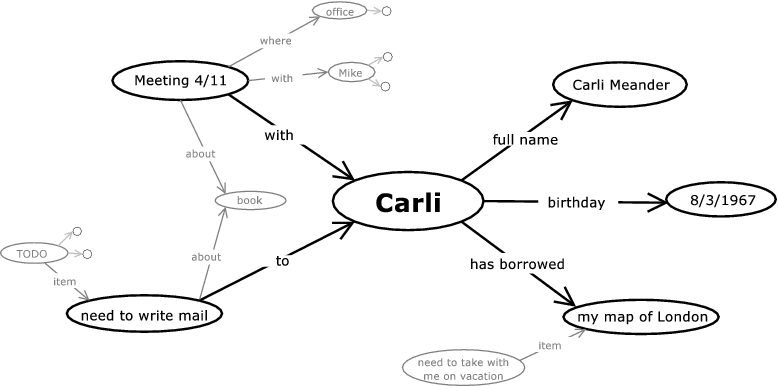
The item we are currently looking at is shown in the middle, items related to it are shown around it. (This visualization is a focus+context (Furnas 1985) view of the item graph. See Section 4.2.1 for details.) Items further away fade into the background; items more than a few steps away are not shown at all. Clicking on a far-away item will bring it to the center.
Related items are always near each other. This allows you see the information you entered in different contexts than the one you entered it in.
This may be intended; for example, when you are planning to meet somebody, you may want to be reminded of things they borrowed from you and ought to return. It may also be unintended: planning the next chapter in your novel, you notice that you once had an idea about how to develop one of your characters, which you had forgotten about.
The characters, events, twists of your story would be items, as would be the chapters and parts. You would be connecting the chapter you’re working on to the events in that chapter, which would in turn be connected to the characters they affect; the characters, in turn, would be connected to your notes about them, in this case the idea about how to develop one of them.
One might be concerned what happens if an item has a large number of connections, in the hundreds or thousands. There are a number of factors alleviating this concern.
- Firstly, the items shown are only those connected directly or through a short path to the item we are looking at. Even if we have hundreds of thousands of items in the system, we only show a small number of them at a time.
- Secondly, as we have stressed above, this is a tool for personal use, and will presumably contain mostly connections made by its particular user. Thus, rather than categorizing thousands of e-mails as discussing a particular subject, for example, a user could easily categorize them as making a smaller number of arguments, items connected to the subject.
- Thirdly, connections will be typed, as shown in the mock-up (“with,” “to,” “has borrowed”), and a user will be able to toggle each connection type to be shown or hidden. A user would usually switch off the connection types not relevant to the task at hand, reducing the number of connections shown. For example, when composing e-mail to the attendees of a meeting, you probably don’t need to know the attendees’ birthdays.
- Finally, in the case that there are a lot of connections with the same type to the same item, we show them as a scrollable list, and allow the user to specify the sorting order. This is useful when you want to, for example, see all your e-mails sorted by date. We are also working on interfaces where there are several foci and the nodes on the paths connecting the foci are emphasized and others de-emphasized – this could make browsing a graph with a high local degree significantly easier.
We propose to build a whole computing environment organizing information around items, rather than splitting it up into files.